VitePress and GitHub Pages
27-3-2023 - updated 15-7-2024
I wanted to try out GitHub Pages and VitePress, so I just gave it a shot this afternoon. I have to say, starting it is very easy. This is the first page of my vite-press website on GitHub Pages.
GitHub Pages
So I started out with the Quickstart for GitHub Pages.
It was really easy to set up the repo. I have done that many times before. However, I spent a full ten seconds looking for the links Under "Build and deployment", under "Source", select Deploy from a branch. That annoyed me, so for future reference:
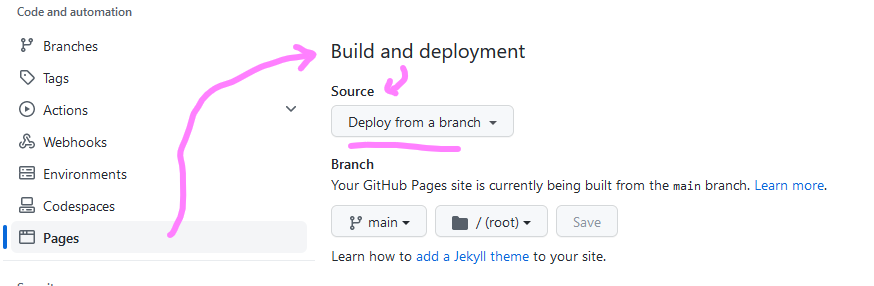
I won't forget that!
VitePress
Next: Quickstart for GitHub Pages.
Which was really, really easy, since I work with vite on a daily basis, and I have everything installed on my laptop already. The documentation of VitePress is perfect for me, since it looks like the Vue documentation.
Action plan (short version)
- Install Node.js version 16 or higher
- Open VS Code, terminal.
- Install VitePress
npm install -D vitepress- Setup VitePress
npx vitepress initAnd answer the questions, for help go to the quickstart mentioned above.
- Run
npm run docs:devAll settled, right? No!
First of all, for the first time in my life Visual Studio Code was bugging me not wanting to push to my repo (I think it wanted to say: workday is over Helmer!). This is really weird since I worked on this account with VS Code earlier today. I have Visual Studio for backend development, so as a quick and dirty fix I fired up VS 2022, cloned and pushed without drama.
Nice!
Gitignore
Wait up! There was no gitignore! I forgot to tell you I added it. So I stole copied one from erresen. Thanks! And I added some extra lines because I need to ignore some more.
That's it, right? Wrong!
Publishing VitePress to GitHub pages
Because it is not your everyday static website, of course it will not be automatically published and showing up. You need a pipeline. As a senior web developer I know all about pipelines, in Azure DevOps, publishing to Azure. This is a tiny bit different, with the help of the VitePress deploy documentation I had the pipeline ready in no time.
Next go to your repository settings. You have to change the build and deployment setting here to "GitHub Actions":
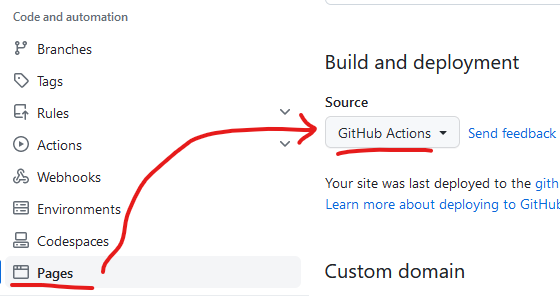
If you forget about this, there will be double deployments, one with the "Deploy from branch", just showing your readme, and one with "VitePress" with your website. Whichever one comes last is deployed on the server.
Conclusion
With the documentation and some research it was not that hard to set up a VitePress website on GitHub Pages. There are a few things I had to figure out, and that is what this blog is for.