Kafka
19-9-2023 - updated 22-2-2024
This article contains my notes on kafka. It is a personal resource, which I put on the website to share with some of my friends.
The first part is about kafka and what I learned. The second part is a how-to guide. Maybe I will split this article in two new ones one day.
Publish-subscribe architecture
In a publish-subscribe pattern, the consumer posts the message to message middleware. The messaging middleware stores the message. The consumer has a subscription on certain messages, and receives these messages from the messaging middleware.
This is analogue to you posting a message on the message board in the supermarket "Looking for a housekeeper". The consumers in the supermarket can look at the board. Someone may be looking for a second hand bike, and not react. A person doing housekeeping and looking for a job might react to your post. You did an async fire and forget (by sticking the post-it on the supermarket board). The supermarket board acts as a buffer, storing your message. In this case, the consumer has to actively look at the board for your message, and in messaging systems you can get a notification.

Benefits
- Loose coupling in time, with fire and forget
- Buffer, durable storage of messages
Disadvantages
- Middleware needs to be maintained
Messaging middleware
There are several messaging middlewares:
- Apache kafka
- RabbitMQ
- ActiveMQ
- Mediatr
MQ stands for message queue.
Problems are often caused by the following factors:
- High volume of messages by all of the applications
- Large messages
- Single server (broker) for the messaging middleware
- Consumer down or slow
- Not fault tolerant
Consumer down or slow
The middleware needs to store the messages if the consumer is down or slow. This may cause the message broker to fail. In the case of Mediatr, you will run out of memory.
Not fault tolerant
The middleware needs to store the messages. If it does not store the message, and the message is handled incorrectly, the message is gone from the middleware.
Kafka
In comes Kafka, created by LinkedIn around 2010 to handle all messaging in the LinkedIn applications. It was designed to be:
- Reliable (Fault tolerant)
- Fast
- Autonomous
- High throughput
- Distributed
- Scalable
Kafka is a high throughput distributed streaming platform.
It can handle high throughput.
- Publish/Subscribe pattern for messaging
- Distributed storage (store data in fault tolerant, durable way)
- Data processing, process events as they occur (event sourcing / event handling)
It is more than a messaging system.
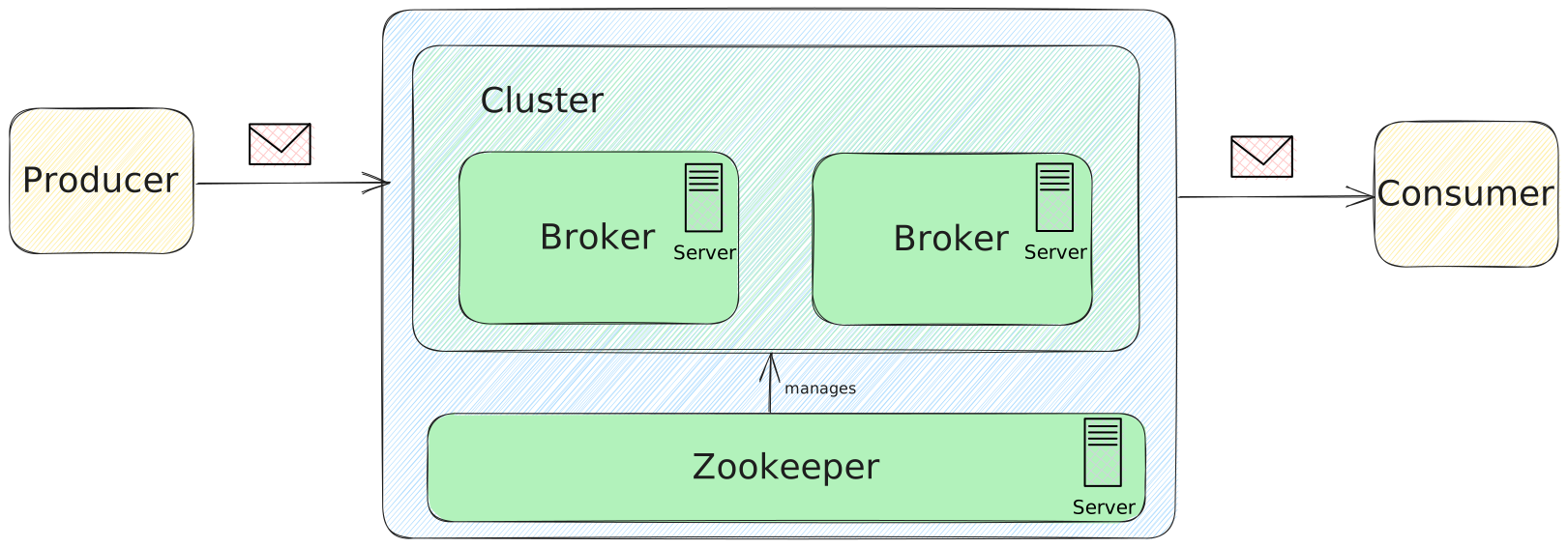
The Kafka middleware runs on a broker. Kafka stores the messages, so it is fault-tolerant. However, what if the server breaks down, goes offline or becomes too busy. In order to guarantee 100% uptime multiple brokers on different servers are used in a cluster. Zookeeper manages the cluster so the consumer knows where to post.
Point-to-point versus publish-subscribe
If there is one producer and one consumer, you have the point-to-point pattern.
If there are multiple consumers, there is publish-subscribe.
How to start a Kafka project in C#
I will take you through my Kafka Quickstart experience. Please check the Kafka website, because quick starts may change.
Step 1 Download Kafka
Go to the Kafka quickstart page
Download the kafka version from the download page suggested by Apache.
Verify the downloaded file (take a look at my side-note) and when you verified it, unpack the file to a location of your choice.
SideNote: Verifying the downloaded file
Verifying the file (for me) is not that straightforward as they say.
You can find the hash you need on the Kafka download page.
- Choose the version folder you downloaded. For me it was 3.5.0
- Find the version you downloaded, for me it was 2.13-3.5.0. There you will find the hashes. Pick a hash that is not deprecated (SHA512 is available)
- Go to your download folder, and type cmd in the explorer url bar to get the command line interface. Type:
certUtil -hashfile kafka_2.13-3.5.0.tgz SHA512This will get you the hash of the file. This hash needs to be the same as the hash given in the download page
Step 2 setup and run the Kafka environment
NOTE: Your local environment must have Java 8+ installed. Install Java (if you do not have it installed already): Java download link. Please check the license terms.
Inside the kafka-version folder you will find a folder named "config". This folder contains the configuration (as you might have guessed).
Zookeeper setup
In this config folder there is a file named zookeeper.properties.
The zookeeper application is the manager for (the cluster of) the broker(s).
By default it starts up on localhost port 2181. If you wish to change that, you can do so by changing the clientPort value in the zookeeper.properties file.
Broker setup
In the config folder there is a file named server.properties. This contains the configuration for kafka brokers
For the demo I want to create two brokers. So I am going to duplicate the config file to server-1.properties.
In this file, first set the id of the broker. This must be set to a unique integer for each broker. Change it from 0 to 1.
broker.id=1Secondly, the address on which the socket server listens on should be changed. By default the host name has the PLAINTEXT listener name, and port 9092. Uncomment and change it to 9093.
listeners=PLAINTEXT://:9093The last property is logdirs, where kafka writes its logs to. change that to log.dirs=/tmp/kafka-logs-1
log.dirs=/tmp/kafka-logs-1Start zookeeper
First start zookeeper. Start Git for Windows bash, go to your kafka root folder (cd /c/projects/kafka), and type:
bin/zookeeper-server-start.sh config/zookeeper.propertiesOr alternatively use the bat file, from your command line interface:
.\bin\windows\zookeeper-server-start.bat config\zookeeper.propertiesThis will start zookeeper.
Start kafka broker(s)
Next start the kafka brokers by starting a new Git bash, and type
bin/kafka-server-start.sh config/server.propertiesIn a third git bash window, start the second broker by typing:
bin/kafka-server-start.sh config/server-1.propertiesStep 3 create a topic to store your events
Create a topic by starting a new git bash and type:
bin/kafka-topics.sh --create --bootstrap-server localhost:9092 --partitions 2 --replication-factor 2 --topic demo-trackingIt will return lots of lines and: "Created topic demo tracking"
It now formed 4 partitions (2 partitions, 2 replicated).
List all topics in a cluster using the following command:
bin/kafka-topics.sh --list --bootstrap-server localhost:9092 demo-trackingStep 4 create a producer
I created an ASP.NET application, could be any type of application as long as it has IHostedService. Install the Confluent kafka nuget package.
In the application In a quick and dirty manner I added this code:
string message = JsonSerializer.Serialize("Hello world");
string bootstrapServer = "localhost:9092";
ProducerConfig config = new ProducerConfig {
    BootstrapServers = bootstrapServer,
    ClientId = Dns.GetHostName(),
};
string topic = "demo-tracking";

try
{
    using (var producer = new ProducerBuilder<Null, string>(config).Build())
    {
        var deliveryResult = await producer.ProduceAsync(topic, new Message<Null, string>
        {
            Value = message
        });
        _logger.Information($"Test message delivered at {deliveryResult.Timestamp.UtcDateTime}");
    };
}
catch (System.Exception)
{
    throw;
}
Find all the anti-patterns. There are 10 in there LOL.
Step 5 create a consumer
Create a service:
using Confluent.Kafka;
using System.Text.Json;
using System.Diagnostics;

public class ApacheKafkaConsumerService : IHostedService
{
    private readonly string topic = "demo-tracking";
    private readonly string groupId = "test_group";
    private readonly string bootstrapServers = "localhost:9092";

    public Task StartAsync(CancellationToken cancellationToken)
    {
        var config = new ConsumerConfig
        {
            GroupId = groupId,
            BootstrapServers = bootstrapServers,
            AutoOffsetReset = AutoOffsetReset.Earliest
        };

        try
        {
            using (var consumerBuilder = new ConsumerBuilder<Ignore, string>(config).Build())
            {
                consumerBuilder.Subscribe(topic);
                var cancelToken = new CancellationTokenSource();

                try
                {
                    while (true)
                    {
                        var consumer = consumerBuilder.Consume(cancelToken.Token);
                        var test = JsonSerializer.Deserialize<string>(consumer.Message.Value);
                        Debug.WriteLine($"Test string: {test}");
                    }
                }
                catch (OperationCanceledException)
                {
                    consumerBuilder.Close();
                }
            }
        }
        catch (Exception ex)
        {
            System.Diagnostics.Debug.WriteLine(ex.Message);
        }

        return Task.CompletedTask;
    }

    public Task StopAsync(CancellationToken cancellationToken)
    {
        return Task.CompletedTask;
    }
}
In Program.cs add:
builder.Services.AddSingleton<IHostedService, ApacheKafkaConsumerService>();Result
Now you are ready to go. Run the application.
Resources
Kafka apache website
Working with Apache Kafka in ASP.NET 6 Core