About NUnit
10-10-2023 - updated 16-1-2024
NUnit is a unit-testing framework for all .Net languages.
Test execution in NUnit
NUnit creates one instance for the test class. The image below depicts the test execution order:
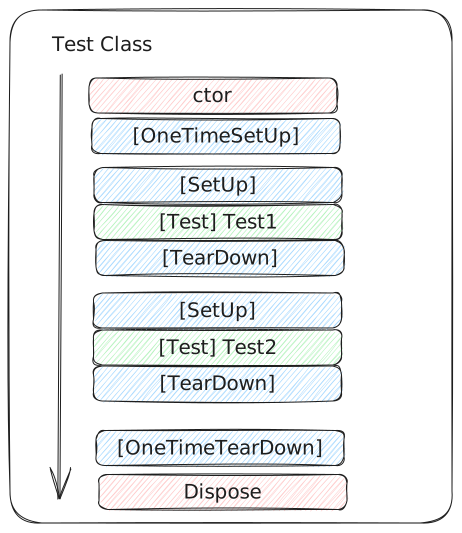
As in any class, first the constructor is run on initialization.
Instead of initializing in the constructor, or after that, you can use the [OneTimeSetUp] attribute method. This is where to write code that you reuse through the whole test class. Think of Logger Mocks and that kind of stuff. OneTimeSetUp breaches test isolation, so think twice about having test data in here. You can put things in here that require lots of time to setup. Speed is of the essence in unit testing. The [SetUp] attribute marks the method where you have shared code to run before each unit test. Next in the test execution, the test is run (Test1). After running the test, the method marked by the [TearDown] attribute is run. And so it goes on, running SetUp-Test-TearDown, until all tests are run.
After all tests are run it will run the method marked by the [OneTimeTearDown] attribute. If the class inherits from IDisposable, this is where the Dispose is run as last in the execution order.
Attributes
Use the [Ignore] attribute to ignore a test in text execution.
The [Category] attribute can be used to sort the unit tests.
Use the [TestCase] attribute to provide data, see the examples in HelmerDemo - NUnit unit tests
The [Values] attribute generates automatic test scenarios for all possible input combination, however be careful with Asserts when using this. It is really nice to use this in Test Driven Development, combined with the [Range] attribute to generate your input.
Assert in NUnit
An Assert should evaluate and verify the outcome of the test.
The outcome of the test is a returned result, a final object state or the occurence of an event observed during execution. An assert should either pass or fail.
If all asserts in a test pass, the test passes. If one assert fails, the test fails.
In a previous company it was allowed to have only one assert per test. I am not that dogmatic, and sometimes use multiple Asserts on an object to find out what is wrong. As long as the Asserts are related to this one behaviour it is fine to me.
Assert on equality
For asserting equality, returns true if two variables have the same value.
Assert.That(actual, Is.EqualTo(expected));Assert on Reference equality
Two references point to the same object in memory
Assert.That(actual, Is.SameAs(expected));Assert floating point numbers
Dealing with floating point numbers means the values will be rounded, and probably (in some cases) not have the same values.
In NUnit you can add the Within, to give a tolerance the values should be within.
Assert.That(a, Is.EqualTo(0.33).Within(0.004));Or give a percentage:
Assert.That(a, Is.EqualTo(0.33).Within(10).Percent);Assert on Collection Contents
I used to compare on Count items, and some or every item to Assert.
In NUnit you can:
Assert.That(result, Has.Exactly(3).Items);Instead of classic count.
Assert.AreEqual(result.Count(), 3);But I think I like the latter better.
No duplicate items in List:
Assert.That(result, Is.Unique);List contains the expected item, with exact values.
Assert.That(result, Does.Contain(expectedItem));You can chain to inspect values inside the list.
Suppose there is a list which contains an object with Name = "name" and Number = 1.
Assert.That(result, Has.Exactly(1)
                        .Property("Name" .EqualTo("name")
                        .And
                        .Property("Number").EqualTo(1);
Mind that the property names are not "typesafe" (or rather object safe?). On refactor, the test will fail.
To mitigate that, there is another way to do this:
// act
List <CatalogItem> result = systemUnderTest.CreateCatalogItems(input);

// assert
Assert.That(result, Has.Exactly(1)
                        .Matches<CatalogItem>(
                                    item => item.Name = "name" &&
                                            item.Number == 1));
Assert Exceptions
Assert exceptions in this manner:
Assert.That(() => new SomeInput(0), Throws.TypeOf<ArgumentOutOfRangeException>());Multiple Asserts
Another pro-use of NUnit is the multiple Assert.
I used to solve multiple asserts like this:
// assert
Assert.That(result.IsSuccess, Is.True); // I expect succes
Assert.That(result.StatusCode, Is.EqualTo(HttpStatusCode.Created) ); // I expect the statuscode to be Created type
Assert.That(_catalogItemLogic.AvailableStock, Is.EqualTo(2)); // I expect the available stock to decrease
It will check line by line, so if the first Assert fails, the test fails, but you do not know anything about why the result was not a success.
In NUnit you can solve this by using Assert.Multiple like this:
Assert.Multiple(() =>
        {
            Assert.That(result.IsSuccess, Is.True);
            Assert.That(result.StatusCode,
                Is.EqualTo(HttpStatusCode.Created));
            Assert.That(_catalogItemLogic.AvailableStock,
                Is.EqualTo(2));
        });
Now NUnit will check the Result object on all of the Asserts, and if the first one fails, you get more information out of the StatusCode value of the result object, about why it is failing. Or you could check the error message available in the result object.
Using custom constraints
If you want to check the full Result, and you do not like repeating yourself in the tests, there is a clever way to check objects versus expected results in NUnit custom constraints.
Assert.That(result, new ResultConstraint(expectedResult));This has the disadvantage that you have no idea what part of the Result object you are asserting anymore. So your test might succeed, because you think the whole Result object is tested, while in fact only testing a few of the properties. Also when you extend a Result object by adding a new property, how do you assure it is actually tested in all of your tests. Having it central might be easier to adapt (maintain the code), but also easy to forget about, leaving you with successful tests that should in fact fail. This is up tp ypu to decide.
Resources
NUnit vs. XUnit vs. MSTest: Comparing Unit Testing Frameworks In C#
NUnit docs
NUnit examples in HelmerDemo.WebShopDemo repo